Create a Playful 4-Panel AI Couple Photo Collage with Doodle Art
Introduction
AI image generators have made it easier than ever to transform simple creative ideas into visually striking photographs. One particularly engaging style is the photo-and-doodle collage, where realistic people interact with playful hand-drawn illustrations.
This prompt creates a warm, cinematic 4-panel couple photo collage featuring coordinated outfits, a heritage architectural setting, and whimsical doodles such as balloons, clouds, paper airplanes, hearts, and hot-air balloons.
The result is ideal for couples, engagement photography inspiration, social media creators, Pinterest content, wedding inspiration, and creative portfolios.
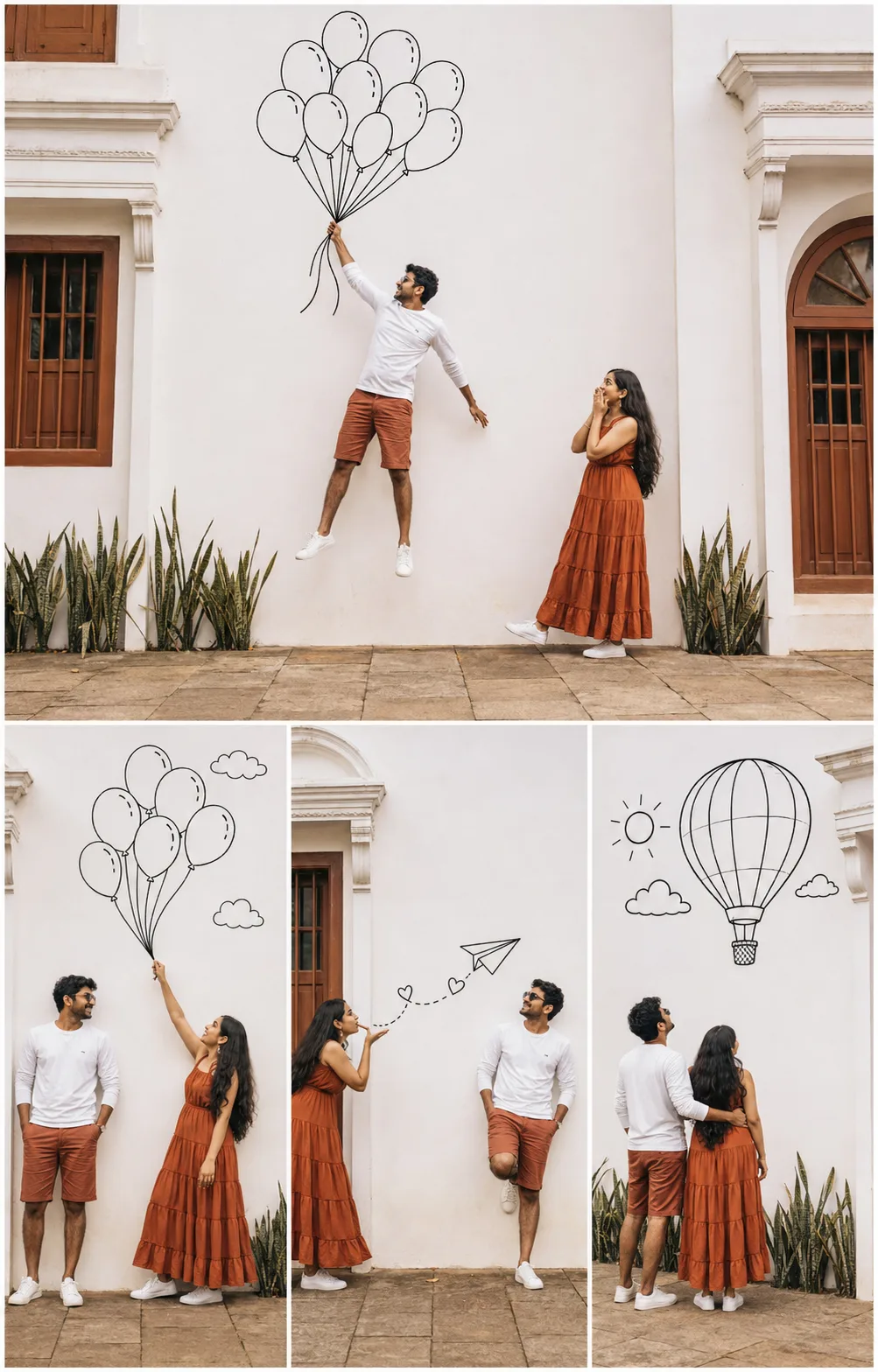
PROMPT
Copy and paste the following prompt into your preferred AI image generator:
🚀 How to Use This Prompt
Using the prompt is simple:
Step 1: Choose an AI Image Generator
Select an AI image-generation platform that supports detailed photographic prompts and, if required, reference images.
Step 2: Copy the Prompt
Copy the complete prompt above rather than using only a short description. The detailed instructions help establish the setting, clothing, poses, composition, and visual style.
Step 3: Add a Reference Image
If you want the generated couple to resemble specific people, upload an appropriate reference image where the platform supports identity or character references.
Make sure you have permission to use the reference image.
Step 4: Generate the Image
Paste the prompt and generate several variations. AI-generated compositions can differ between generations, so creating multiple versions can help you find the strongest result.
Step 5: Refine the Result
If something is incorrect, modify the prompt with targeted instructions such as:
- Make the facial features more natural.
- Keep the outfits consistent across all panels.
- Make the doodles look hand-drawn.
- Improve the architectural details.
- Make the lighting softer.
- Maintain the same couple throughout all four panels.
Benefits of Using This Prompt
Professional Appearance
The prompt combines editorial photography, cinematic lighting, coordinated fashion, architectural photography, and hand-drawn illustration into one concept.
This helps create a polished visual suitable for social media and creative portfolios.
Consistent Storytelling
Each panel represents a different interaction between the couple and the doodle elements. Instead of producing four unrelated photographs, the composition creates a visual story.
Creative Customization
The concept can easily be adapted to different outfits, locations, seasons, themes, and relationships.
Social Media Friendly
The vertical 4:5 composition works particularly well for platforms where portrait-oriented images receive strong visual attention.
Creative Customization Ideas
You can change individual elements while keeping the basic concept intact.
Change the Location
Try:
- European-style courtyard
- Kerala heritage house
- Beachside villa
- Old colonial building
- Rustic café
- Botanical garden
- Rooftop terrace
- Traditional Indian palace
Change the Doodles
Instead of balloons and paper airplanes, experiment with:
- Butterflies
- Flowers
- Stars
- Musical notes
- Coffee cups
- Shooting stars
- Umbrellas
- Birds
- Cameras
- Wedding rings
Change the Photography Style
Try:
- Vintage film photography
- Luxury editorial photography
- Soft romantic photography
- Fashion campaign photography
- Dreamy pastel photography
- Black-and-white photography
- Analog 35mm photography
Change the Season
You can also create seasonal versions featuring:
- Spring flowers
- Summer sunlight
- Autumn leaves
- Winter atmosphere
- Monsoon clouds
Best AI Apps for This Prompt
Different AI image generators can interpret the same prompt differently. When choosing a platform, look for support for detailed prompts, image references, aspect-ratio controls, and image editing.
Popular options include:
- OpenAI image generation
- Midjourney
- Adobe Firefly
- Google image-generation tools
- Other advanced AI photography and creative-generation platforms
Features and capabilities can change as AI models are updated, so always check the current platform documentation before using a particular workflow.
Commercial Uses
A creative AI-generated couple collage can be adapted for several commercial applications, depending on the platform's licensing terms and the rights associated with any reference images.
Potential uses include:
Social Media Marketing
Use the image as an engaging visual for Instagram, Threads, Facebook, or Pinterest campaigns.
Wedding Inspiration
Wedding photographers and planners can use similar concepts as creative mood-board inspiration.
Fashion Promotion
The coordinated outfits can be adapted into promotional visuals for clothing brands and fashion campaigns.
Photography Portfolios
Photographers and designers can use AI-assisted concepts to demonstrate creative direction and visual storytelling.
Advertising Concepts
The collage format can serve as an early visual concept for campaigns involving fashion, travel, lifestyle, or couples.
Always verify the commercial-use rights of the AI platform and any third-party assets before using generated content commercially.
Common Mistakes to Avoid
1. Using an Overly Short Prompt
A simple prompt such as "make a couple collage with doodles" may not provide enough information to produce the desired composition.
2. Forgetting Composition
Clearly specify which elements belong in the top panel and which belong in the bottom three panels.
3. Inconsistent Clothing
When generating multiple panels, explicitly describe the outfits and request consistency throughout the collage.
4. Unrealistic Anatomy
AI-generated people can sometimes have unnatural hands, feet, or body proportions. Generate multiple versions and carefully inspect the final image.
5. Too Many Visual Elements
Adding excessive objects can make the composition confusing. Keep the main visual story focused on the couple and the doodles.
6. Ignoring Aspect Ratio
For Pinterest and many social-media applications, vertical compositions can be particularly useful. Specify the desired aspect ratio before generation.
Pro Tips for Stunning Results
Be specific about the environment.
Instead of saying "old building," describe architectural materials, windows, plants, flooring, and lighting.
Describe the interaction.
The strongest part of this concept is the interaction between real people and imaginary doodles.
Maintain visual consistency.
Repeat important clothing, hairstyle, and environmental details throughout the prompt.
Use natural expressions.
Words such as "candid," "joyful," "natural expressions," and "playful poses" can help create a less artificial photographic appearance.
Generate multiple variations.
Don't rely on the first generation. Compare several outputs and choose the one with the best composition and anatomy.
Refine individual problems.
If one panel is weak, use an editing or variation workflow instead of completely rewriting the concept.
Keep the doodles simple.
Clean black line-art generally creates a stronger contrast against a bright architectural background.
Final Thoughts
The combination of realistic photography and hand-drawn doodles creates an imaginative visual language that feels both modern and personal.
This 4-panel concept works especially well because every frame tells part of the same story. The couple's coordinated outfits establish visual harmony, while the doodles introduce humor, movement, and creativity.
With small changes to the location, clothing, doodles, lighting, and photography style, the same concept can produce many unique creative campaigns.
Conclusion
AI image generation becomes much more powerful when a prompt describes not only what should appear in an image, but also how the subjects should interact, how the scene should be composed, and what emotional feeling the final image should communicate.
This playful couple collage is a great example of combining photography, fashion, architecture, illustration, and storytelling into one AI-generated visual concept.
Experiment with different locations, outfits, doodles, and photographic styles to develop your own signature version.
Disclaimer
This article is provided for educational and creative purposes only. Results may vary depending on the AI platform, model version, settings, and reference image quality used. Users are responsible for ensuring they have appropriate rights to any images uploaded or generated. Always review the licensing and usage policies of your chosen AI image generator before commercial use.


Comments
Post a Comment