Create a Stunning Geometric 3D AI Portrait with This Creative Prompt
Introduction
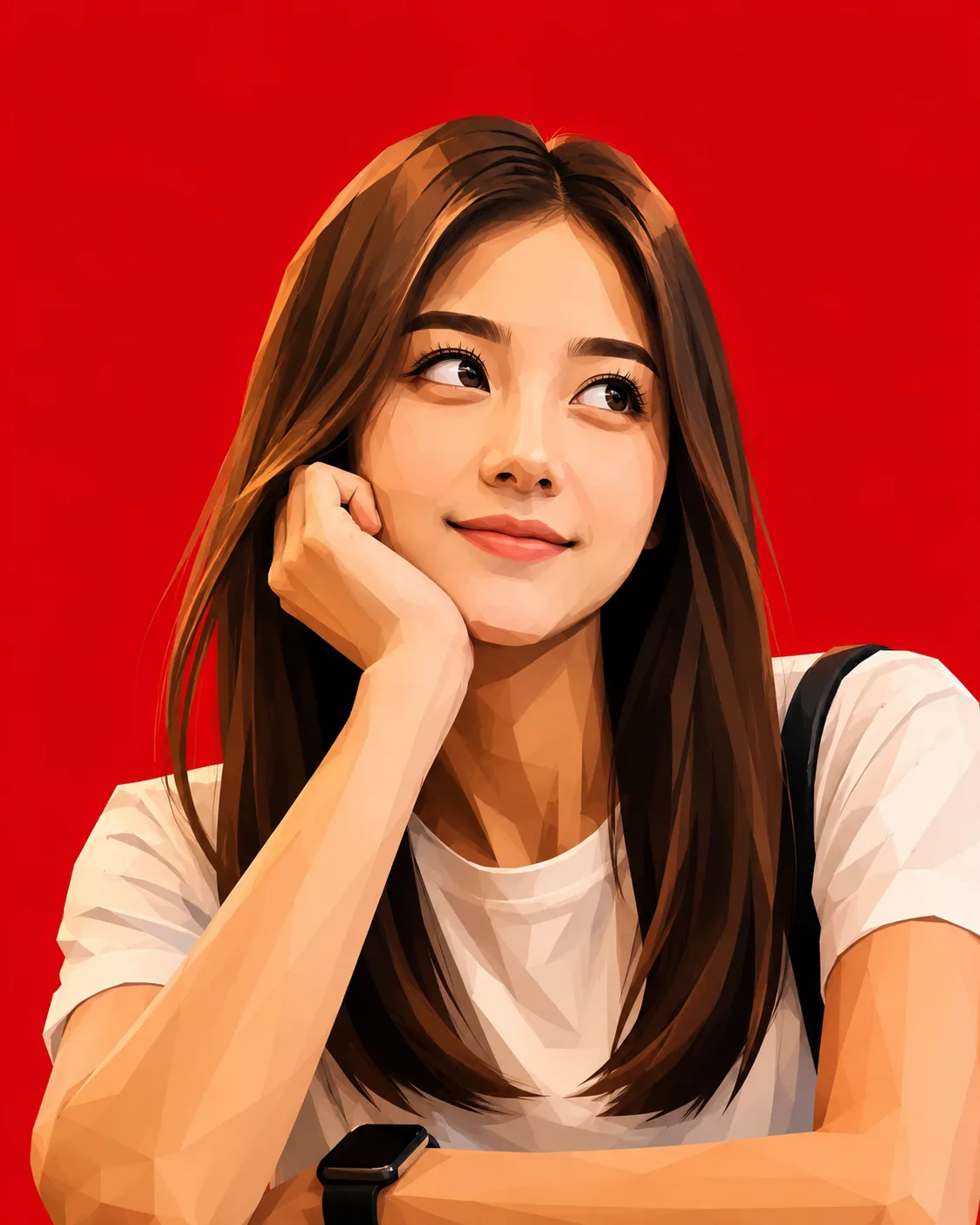
AI image generation has made it easier than ever to transform ordinary photographs into striking works of digital art. One particularly eye-catching style is the vector-meets-3D caricature, combining geometric facial planes, dramatic lighting, bold colors, and modern graphic-design aesthetics.
This guide shows you how to create a similar stylized 3D portrait with a vibrant crimson-red background using a reference image and a carefully structured AI prompt.
🚀 How to Use This Prompt
Follow these steps to create your artwork:
- Choose a clear, high-quality portrait as your reference image.
- Upload the image to an AI image-generation platform that supports image references.
- Copy the prompt provided below.
- Add your preferred aspect ratio, such as 4:5, for a portrait-oriented composition.
- Generate the image.
- If the facial expression, hairstyle, or composition needs improvement, refine the prompt and regenerate.
- Review the final result before publishing or using it commercially.
PROMPT
Benefits of Using This Prompt
🎨 Professional Appearance
The prompt combines several visual techniques that help produce a polished editorial-style illustration:
- Geometric facial planes
- Controlled gradients
- Strong light and shadow
- Bold color contrast
- Clean background separation
- Stylized 3D rendering
- Modern graphic-design composition
The crimson background creates a strong visual identity while making the darker hair and facial features stand out.
✨ Creative Customization Ideas
You can easily customize the prompt by changing:
Background colors
- Crimson red
- Deep blue
- Emerald green
- Orange
- Purple
- Matte black
Art styles
- Low-poly 3D
- Futuristic vector art
- Comic-book illustration
- Anime-inspired 3D
- Editorial caricature
- Cyberpunk portrait
- Luxury fashion illustration
Lighting
- Studio lighting
- Rim lighting
- Neon lighting
- Golden-hour lighting
- Dramatic side lighting
- High-contrast cinematic lighting
You can also experiment with different expressions, poses, accessories, hairstyles, and clothing.
Best AI Apps for This Prompt
The prompt can be adapted for many modern AI image-generation platforms. Depending on the platform, you may have different controls for:
- Reference-image strength
- Image-to-image transformation
- Aspect ratio
- Stylization
- Detail level
- Negative prompts
- Composition
- Lighting
For the best results, use a platform that supports image references or image-to-image generation when you want the generated artwork to retain recognizable characteristics from the reference.
Commercial Uses
Stylized AI portraits can be useful for a variety of creative projects, including:
- Social media profile artwork
- Pinterest graphics
- Blog illustrations
- Digital posters
- Personal branding
- Website graphics
- Creative portfolios
- YouTube thumbnails
- Marketing campaigns
- Digital artwork collections
- Merchandise concepts
- Editorial illustrations
Before using an AI-generated image commercially, always verify the licensing conditions of the AI platform and make sure you have the necessary rights to the reference image.
Common Mistakes to Avoid
1. Using a Low-Quality Reference
A blurry or poorly lit reference can make it harder for an AI model to preserve important facial and visual characteristics.
Tip: Use a clear, well-lit image with the subject's face clearly visible.
2. Overloading the Prompt
Adding too many conflicting instructions can produce inconsistent results.
Tip: Keep the core requirements clear: subject, pose, art style, lighting, background, and composition.
3. Ignoring Composition
If you want a portrait suitable for Pinterest or social media, specify the desired orientation.
For example:
4:5 vertical composition
4. Expecting Perfect Identity Preservation
Stylization can change facial proportions, expressions, and other visual characteristics.
Tip: Use a suitable reference image and refine the prompt if the result moves too far away from the intended appearance.
5. Forgetting Background Control
A detailed background can compete with the subject.
Tip: A solid crimson background works particularly well for this style because it keeps the focus on the character.
Pro Tips for Stunning Results
💡 Use a Strong Reference Image
A sharp portrait with good lighting generally provides better visual information for image transformation.
💡 Describe the Visual Style Clearly
Instead of simply saying "make it 3D," describe the characteristics you want:
angular planes + smooth gradients + geometric hair + soft shadows + dramatic lighting
This gives the model more visual direction.
💡 Use Color Contrast
Pairing dark hair and clothing with a bright crimson background creates a powerful graphic composition.
💡 Experiment With Expressions
Try variations such as:
- Looking upward
- Looking sideways
- Slight smile
- Playful expression
- Curious expression
- Dramatic expression
💡 Try Multiple Generations
AI generation is often an iterative process. Generate several versions and select the one with the strongest composition, facial expression, lighting, and overall style.
Final Thoughts
The vector-meets-3D caricature style is an excellent way to transform a conventional portrait into something visually distinctive. The combination of geometric shapes, expressive features, bold lighting, and a crimson studio background creates a modern artwork that works particularly well for social media, Pinterest, portfolios, and creative branding.
The most important part is experimentation. Change the background, expression, lighting, clothing, and degree of exaggeration until you find a visual style that feels uniquely yours.
Conclusion
AI image generation becomes much more powerful when a prompt gives the model clear artistic direction. By combining a quality reference image with specific instructions for composition, facial expression, geometry, lighting, color, and rendering style, you can create highly distinctive digital portraits.
Save this prompt as a starting point and customize it for your own creative projects.
Disclaimer
This article is provided for educational and creative purposes only. Results may vary depending on the AI platform, model version, settings, and reference image quality used. Users are responsible for ensuring they have appropriate rights to any images uploaded or generated. Always review the licensing and usage policies of your chosen AI image generator before commercial use.
Follow Us On
📌Pinterest: Click here
Threads: Click here


Comments
Post a Comment