Create Stunning AI Portraits with a Kerala-Inspired Classical Dance Prompt
Introduction
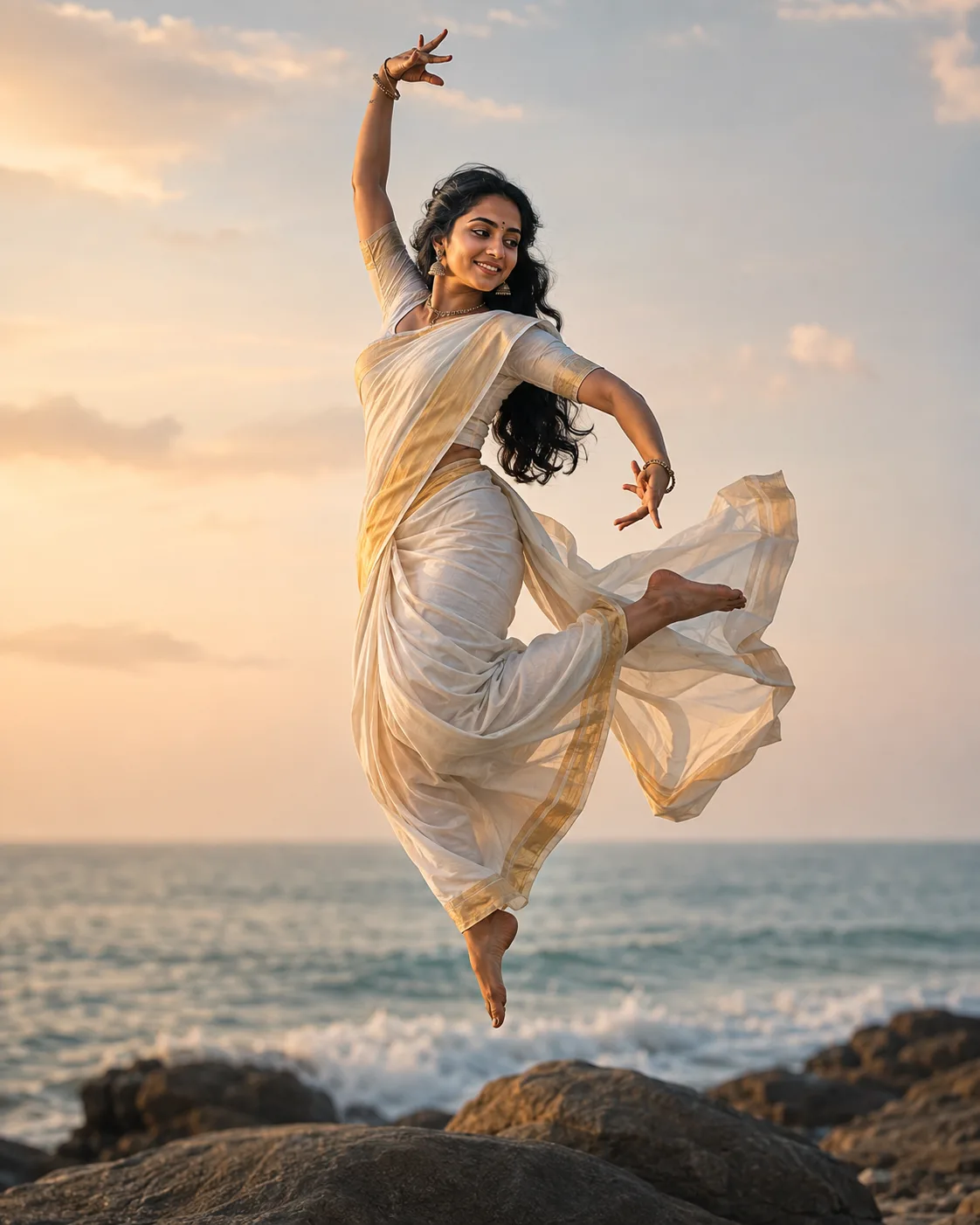
AI image generators have made it possible to transform creative ideas into highly realistic, cinematic images within seconds. With the right prompt, you can create elegant portraits featuring traditional Indian fashion, classical dance poses, dramatic landscapes, cinematic lighting, and realistic fabric details.
This guide explores how to use a detailed Kerala-inspired AI fashion and classical dance prompt to create professional-looking images suitable for social media, Pinterest, blogs, portfolios, and creative projects.
🚀 How to Use This Prompt
Using the prompt is simple:
Step 1: Choose an AI Image Generator
Open your preferred AI image-generation platform and select an image-generation model that supports detailed photographic prompts.
Step 2: Upload a Reference Image
If you want the generated character to resemble a particular person, use an image that you have permission to use as a reference.
A clear portrait with good lighting generally produces better results.
Step 3: Paste the Prompt
Copy the complete prompt above and paste it into the prompt field.
Step 4: Select the Aspect Ratio
For Pinterest, Instagram, Threads, and other vertical social media content, 4:5 is a useful format.
Step 5: Generate Multiple Variations
Don't stop at the first result. Generate several versions and compare:
- Facial expression
- Saree details
- Dance pose
- Hair movement
- Lighting
- Background
- Hand position
- Fabric movement
Step 6: Refine the Result
If something isn't correct, modify only the relevant portion of the prompt instead of rewriting everything.
For example:
"Make the saree border more detailed with traditional antique-gold temple motifs."
Benefits of Using This Prompt
A carefully structured prompt gives the AI clear information about the desired visual style.
🎨 Better Visual Direction
The prompt specifies clothing, pose, environment, lighting, camera characteristics, and atmosphere.
👗 Detailed Traditional Fashion
The Kanchipuram silk saree, zari border, blouse, jewelry, and styling help establish a sophisticated South Indian aesthetic.
🌅 Cinematic Environment
Golden-hour lighting, an ocean horizon, coastal rocks, and soft clouds create a dramatic background.
💃 Dynamic Composition
The floating classical dance pose introduces movement and makes the image more visually interesting.
📱 Social-Media Friendly
The vertical 4:5 composition works particularly well for social-media posts and Pinterest-style visual content.
Professional Appearance
Several elements of this prompt contribute to a professional photographic appearance.
1. Fabric Details
Words such as:
"natural silk sheen," "woven gold detailing," "fluid fabric folds," and "high-detail fabric texture"
encourage the AI to focus on realistic clothing.
2. Lighting
The phrase:
"warm golden-hour sunlight"
creates warm highlights and soft shadows.
3. Camera Characteristics
Including:
"85mm lens, f/2.8, shallow depth of field"
helps communicate the desired photographic aesthetic.
4. Natural Skin Texture
Using:
"natural skin tones"
can help avoid an overly artificial appearance.
5. Cinematic Color Grading
This adds a polished editorial and photography-inspired finish.
Creative Customization Ideas
The same basic prompt can be transformed into many different concepts.
💚 Green Saree
Replace the purple saree description with:
"A luxurious emerald-green Kanchipuram silk saree with an intricate antique-gold zari border."
❤️ Red Saree
Try:
"A rich crimson-red Kanchipuram silk saree with an elaborate golden zari border and traditional South Indian motifs."
💙 Royal Blue Saree
Try:
"A deep royal-blue silk saree featuring intricate gold zari patterns and a luxurious traditional border."
🤍 White and Gold
For a classic Kerala-inspired aesthetic:
"An elegant ivory-white Kerala silk saree with a traditional golden kasavu border."
🌴 Change the Background
You can replace the beach with:
- Kerala backwaters
- Coconut plantations
- Traditional Kerala architecture
- Temple courtyard
- Palace interior
- Misty hill station
- Tropical garden
Best AI Apps for This Prompt
Different AI image-generation platforms can interpret detailed prompts differently. When selecting a tool, consider:
- Photorealistic image quality
- Reference-image support
- Character consistency
- Aspect-ratio options
- Image editing capabilities
- Commercial-use licensing
- Output resolution
Always check the current terms and licensing policies of the AI platform you choose, especially if you intend to use generated images commercially.
Commercial Uses
AI-generated fashion and cultural imagery can be useful for a variety of creative projects.
📌 Pinterest Content
Create visually attractive pins around:
- Saree fashion
- Kerala culture
- Indian fashion inspiration
- AI photography
- Classical dance
- Traditional fashion
📱 Social Media
The images can be used as creative visuals for platforms such as Threads, Instagram, and Facebook, subject to the platform's rules.
📰 Blog Images
Use generated visuals to enhance fashion, photography, AI-art, and cultural articles.
🎨 Creative Portfolios
AI-generated artwork can demonstrate your ability to develop concepts, prompts, compositions, and visual styles.
🛍️ Marketing Concepts
Businesses can potentially use AI-generated visuals for mood boards, campaign concepts, and promotional materials, provided the applicable AI-tool and asset licensing permits such use.
Common Mistakes to Avoid
❌ Using an Extremely Short Prompt
Instead of:
"Indian woman in saree at beach."
provide information about the clothing, pose, environment, lighting, and photography style.
❌ Adding Too Many Conflicting Instructions
If you request multiple incompatible poses, lighting styles, clothing styles, and environments, the model may produce inconsistent results.
❌ Ignoring Aspect Ratio
For vertical social-media content, specify an appropriate vertical composition.
❌ Overusing Quality Keywords
Adding dozens of phrases such as "8K, ultra HD, maximum quality, perfect, masterpiece" doesn't necessarily improve the image.
Specific visual instructions are generally more useful.
❌ Using a Reference Image Without Permission
Only upload images that you have the right to use, particularly when creating content intended for publication or commercial purposes.
Pro Tips for Stunning Results
✨ Tip 1: Describe the Subject First
Start with the person, clothing, and pose before describing the environment.
✨ Tip 2: Specify Fabric
Instead of simply saying "silk saree," describe:
- Silk type
- Color
- Zari
- Texture
- Border
- Draping
- Movement
✨ Tip 3: Use Lighting Carefully
Try variations such as:
- Golden hour
- Soft morning light
- Dramatic sunset
- Diffused daylight
- Studio lighting
✨ Tip 4: Experiment with Camera Language
Terms such as:
85mm lens, shallow depth of field, cinematic photography, soft bokeh
can help establish a photographic direction.
✨ Tip 5: Generate Variations
Small changes can produce dramatically different results. Experiment with:
"looking to her left"
versus:
"looking toward the horizon"
or:
"soft joyful smile"
versus:
"serene traditional expression."
✨ Tip 6: Keep Cultural Details Consistent
If you want a Kerala-inspired aesthetic, keep the clothing, jewelry, hairstyle, and environment visually consistent with the overall concept.
Final Thoughts
The quality of an AI-generated image depends heavily on how clearly the idea is communicated.
A strong prompt doesn't simply describe what the subject looks like. It also explains:
who → what → where → pose → clothing → lighting → camera → atmosphere → composition
This makes it easier for an AI image generator to understand the creative direction.
The Kerala-inspired classical dance concept combines traditional Indian fashion, graceful movement, coastal scenery, golden-hour lighting, and cinematic photography to create an elegant visual style.
Conclusion
AI image generation provides creators with powerful tools for turning imaginative concepts into visual content.
By combining detailed clothing descriptions, traditional cultural elements, expressive poses, realistic photography terminology, and a carefully selected aspect ratio, you can create striking images for Pinterest, social media, blogs, portfolios, and creative projects.
Experiment with different saree colors, locations, poses, lighting conditions, and artistic directions to develop your own unique visual style.
Disclaimer
This article is provided for educational and creative purposes only. Results may vary depending on the AI platform, model version, settings, and reference image quality used. Users are responsible for ensuring they have appropriate rights to any images uploaded or generated. Always review the licensing and usage policies of your chosen AI image generator before commercial use.
📌 Follow Us
Pinterest: Click here
Threads: Click here


Comments
Post a Comment